Sunday, July 31, 2011
Tips: How to Debrand HTC Sensation
Here's a guide that I've been found that make use in debranding HTC Sensation. A lot of advance users been looking for this guide, but yet now I found out a step by guide over XDA developer.
After searching with no success for a clear way to debrand your sensation, I finally found a way reading lots of snippets, so thought I'd write it into one guide, to help others. This guide was written assuming you're running Windows, but other OS users should be able to follow most parts, except extracting rom.zip from the RUU.
This method can also be use to rebrand/reflash back to stock.
If you follow this guide, you do so at your own risk, I cannot be held responsible if something goes wrong.
This process will wipe ALL data, including any recovery partitions or boot loaders you have installed.
S-OFF WILL BE RETAINED. This method, does not affect your CID, or require root.
 Head-over at XDA-developer and follow the step by step tutorials on how to Debrand your HTC Sensation.
ContinueReading..
After searching with no success for a clear way to debrand your sensation, I finally found a way reading lots of snippets, so thought I'd write it into one guide, to help others. This guide was written assuming you're running Windows, but other OS users should be able to follow most parts, except extracting rom.zip from the RUU.
This method can also be use to rebrand/reflash back to stock.
If you follow this guide, you do so at your own risk, I cannot be held responsible if something goes wrong.
This process will wipe ALL data, including any recovery partitions or boot loaders you have installed.
S-OFF WILL BE RETAINED. This method, does not affect your CID, or require root.


Friday, July 29, 2011
Trick: How to Take Screenshot (Screen Capture) on Samsung Galaxy Ace S5830
This guide are for Samsung Galaxy Ace users that doesn't know yet how to take or capture screen image from the phone. When I got my Ace S5830 I have the same scenario too, then tweaking up and tried to press several button combination. And fortunately I figured it out after trying several attempts pressing the HOME button with the BACK button (touch sensitive buttons - on the left and right of HOME button). Bingo! that's how we can take and save screenshots on our Galaxy Ace.
An example of a screenshot on my Samsung Galaxy Ace

Method :
Navigate to the screen you want to take screenshot ( homescreens, menu's, or game screens, etc ) press and hold the back button in the right corner while holding it, press menu key once and a notification will say the screenshot is taken. The images will then automatically save in the image file folder called "Screencapture"
That's it all!
ContinueReading..
An example of a screenshot on my Samsung Galaxy Ace
Method :
Navigate to the screen you want to take screenshot ( homescreens, menu's, or game screens, etc ) press and hold the back button in the right corner while holding it, press menu key once and a notification will say the screenshot is taken. The images will then automatically save in the image file folder called "Screencapture"
That's it all!
Saturday, July 23, 2011
How to Free up Internal Memory on Samsung Galaxy Ace
Here's a simple tips on Samsung Galaxy Ace that help how to free up internal memory with just one click. All you need to have is a rooted Samsung Galaxy Ace and install and used this application called "Gemini App Manager" its Free and already proven works and tried myself.
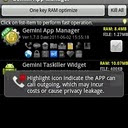
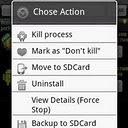
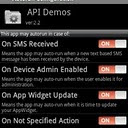
This "Gemini App Manager"can move application such as facebook, twitter etc. This also move maps but
my experience I say don't move Maps as its system application and needs to acess gps,wifi and many other system rescources so leave it on internal memory bcoz if u forecfully moved map, it will become unfuntional of no use, so leave it as it is
Features of this application:
Show app information (including risk info, e.g. show which app can call outgoing, or can send out SMS, or can use Camera, or can find your location (GPS), etc),
Autorun management (enable/disable conditions for autorun),
Kill process (one key RAM optimize, kill all, or kill by selection),
Move/batch move apps from phone to SD card(Android 2.2 or later),
Move/batch move apps from SD card to phone(Android 2.2 or later),
Uninstall/batch uninstall apps,
View application details
Clear app cache,
View app on market,
Sort apps by multi ways,
Filter apps by multi ways,
Grab the application here:
http://www.appbrain.com/app/gemini-app-manager/com.seasmind.android.gmappmgr
ContinueReading..


This "Gemini App Manager"can move application such as facebook, twitter etc. This also move maps but
my experience I say don't move Maps as its system application and needs to acess gps,wifi and many other system rescources so leave it on internal memory bcoz if u forecfully moved map, it will become unfuntional of no use, so leave it as it is
Features of this application:
Show app information (including risk info, e.g. show which app can call outgoing, or can send out SMS, or can use Camera, or can find your location (GPS), etc),
Autorun management (enable/disable conditions for autorun),
Kill process (one key RAM optimize, kill all, or kill by selection),
Move/batch move apps from phone to SD card(Android 2.2 or later),
Move/batch move apps from SD card to phone(Android 2.2 or later),
Uninstall/batch uninstall apps,
View application details
Clear app cache,
View app on market,
Sort apps by multi ways,
Filter apps by multi ways,
Grab the application here:
http://www.appbrain.com/app/gemini-app-manager/com.seasmind.android.gmappmgr
How to Connect the Samsung Galaxy S2/SII I9100 to PC via USB
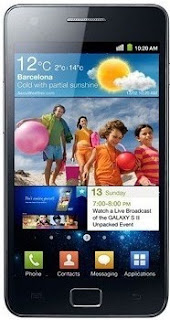
Many users who just recently bought Samsung Galaxy S2 I9100 struggling an issue when tried to connect the phone to the PC to access the SD card though, and somehow it didn’t really work. An error message appears "Android MTP Failed!".
Some few tips below might help you to the task and managed to access the phone’s internal SD card on PC. Just ensure that you have already installed necessary drivers for your Samsung Galaxy S2 or install KIES on your PC.
Here's how,
-Enable usb debugging from Menu > Settings > Applications
-return to home screen
-plug usb cable in
-pull down status bar
-press ‘ connect usb storage’ button
or try this method:
Alternatively, without USB debugging enabled
Go to Settings > Wireless & Network > USB utilities and click the button > then (and ONLY then) plug in USB cable
Hope this helps...
Some few tips below might help you to the task and managed to access the phone’s internal SD card on PC. Just ensure that you have already installed necessary drivers for your Samsung Galaxy S2 or install KIES on your PC.

Here's how,
-Enable usb debugging from Menu > Settings > Applications
-return to home screen
-plug usb cable in
-pull down status bar
-press ‘ connect usb storage’ button
or try this method:
Alternatively, without USB debugging enabled
Go to Settings > Wireless & Network > USB utilities and click the button > then (and ONLY then) plug in USB cable
Hope this helps...
Thursday, July 21, 2011
Tips: How to fix Samsung Galaxy Gio S5660 shutdown/freeze randomly
If you are having problem with your Samsung Galaxy Gio runs in Gingerbread OS that automatically shutdown, freeze and randomly reboot, try one of these:
. Install Green Power free or similar (juice defender, this you need to buy at least Plus version).
. Change your Wifi sleep policy to Never.
Go into Settings>Wireless and networks>Wifi settings
then press the menu button >advanced >wifi sleep policy
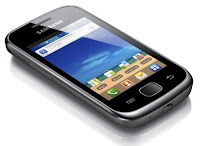
This is only a temporary solution until Samsung release for an update to fix such bugs on Samsung Galaxy Gio. If the problem still persist you can then do hard reset through settings> factory reset.
or by button combination in recovery mode. Just back all the data stored in your device first.
Press and hold Volume up+Center+Power Button, then select Wipe Cache/Factory Reset. Then select Reboot System.
ContinueReading..
. Install Green Power free or similar (juice defender, this you need to buy at least Plus version).
. Change your Wifi sleep policy to Never.
Go into Settings>Wireless and networks>Wifi settings
then press the menu button >advanced >wifi sleep policy

This is only a temporary solution until Samsung release for an update to fix such bugs on Samsung Galaxy Gio. If the problem still persist you can then do hard reset through settings> factory reset.
or by button combination in recovery mode. Just back all the data stored in your device first.
Press and hold Volume up+Center+Power Button, then select Wipe Cache/Factory Reset. Then select Reboot System.
Wednesday, July 20, 2011
Download Samsung Galaxy Gio S5660 User Manual
Here's what you are looking for the Galaxy Gio S5660 User Manual you can download it here. It was not yet long time ago since the Samsung Galaxy Ace S5830 has been released and you will need to know how to navigate of its function.
Well, here's the Samsung Galaxy Gio S5660 User Manual
Samsung Galaxy Gio GT-S5660 mobile phone user manual is now available online and can be downloaded directly at Samsung website. This Samsung Galaxy Gio GT-S5660 manual comes in 130 pages on PDF document format (2.66 MB).
All you need to know about how to use you Samsung Galaxy Gio S5660 is on it.
ContinueReading..
Well, here's the Samsung Galaxy Gio S5660 User Manual
Samsung Galaxy Gio GT-S5660 mobile phone user manual is now available online and can be downloaded directly at Samsung website. This Samsung Galaxy Gio GT-S5660 manual comes in 130 pages on PDF document format (2.66 MB).
Samsung Galaxy Gio GT-S5660 User Manual PDF
Download here.All you need to know about how to use you Samsung Galaxy Gio S5660 is on it.
Sunday, July 17, 2011
How to Auto Adjust the Screen Brightness on Samsung Galaxy S II I9100
Here's how to quickly change or adjust the LCD Screen display brightness on your Samsung Galaxy S II I9100, anytime you want that suit for your eyesight preference.
Here's how you can adjust the screen brightness levels to your like.
1. From Home Screen, go to Settings then Tap on Display

2.On the Brightness window, uncheck the Automatic brightness checkbox.
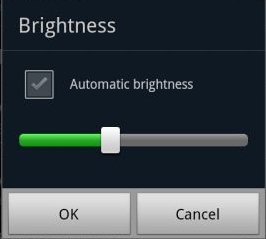
3. Return back to the Home Screen
4. At the top of the screen, by long pressing that notification bar for a second, then you can swipe it to the LEFT to Decrease and by swiping it to Right will Increase the screen brightness.
In that set up you can now manually adjust the screen brightness while reading text without going though the display settings again.
ContinueReading..
Here's how you can adjust the screen brightness levels to your like.
1. From Home Screen, go to Settings then Tap on Display
2.On the Brightness window, uncheck the Automatic brightness checkbox.
3. Return back to the Home Screen
4. At the top of the screen, by long pressing that notification bar for a second, then you can swipe it to the LEFT to Decrease and by swiping it to Right will Increase the screen brightness.
In that set up you can now manually adjust the screen brightness while reading text without going though the display settings again.
Subscribe to:
Posts (Atom)